User Attributes Debugging
Homa Console provides an interface for sending and modifying user attributes in JSON format. SDK users can use this tool to test their game with different attributes and observe how changes affect the game’s behavior.
How to access
To access user attributes debug view, open the Homa Console, navigate to the sidebar, select the LiveOps module, and choose the User Attributes tab.
Features
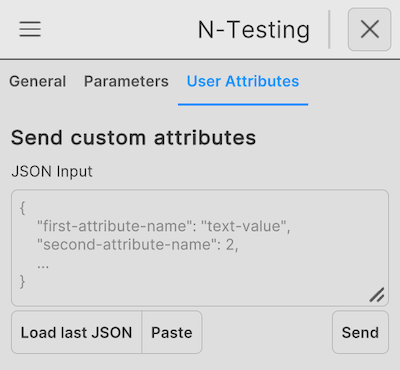
- JSON Input Field: Allows manual input of user attributes in JSON format.
- Load Last JSON: Restores the most recently used attributes for quick testing.
- Paste: Inserts copied JSON data into the input field.
- Send: Sends the entered attributes to update the user’s profile in real time.
SDK users can input attributes, modify values, and observe how the game responds to these changes.