Updating Configs using LiveOps
Modifying configuration at runtime can be useful for testing different game configurations without the need to rebuild the game. In this tutorial, you'll learn how to modify a config object using LiveOps parameters.
Requirements
- You completed the Accessing Configs tutorial.
com.homagames.sdk-coreversion 5.0.1 or higher is installed.com.homagames.configurationversion 1.0.0 or higher is installed.- Access to Homa Lab.
Define LiveOps parameter
Create a new parameter in LiveOps to modify the HealthScalingFactor property of the
EnemyBalanceConfig created in the first tutorial.
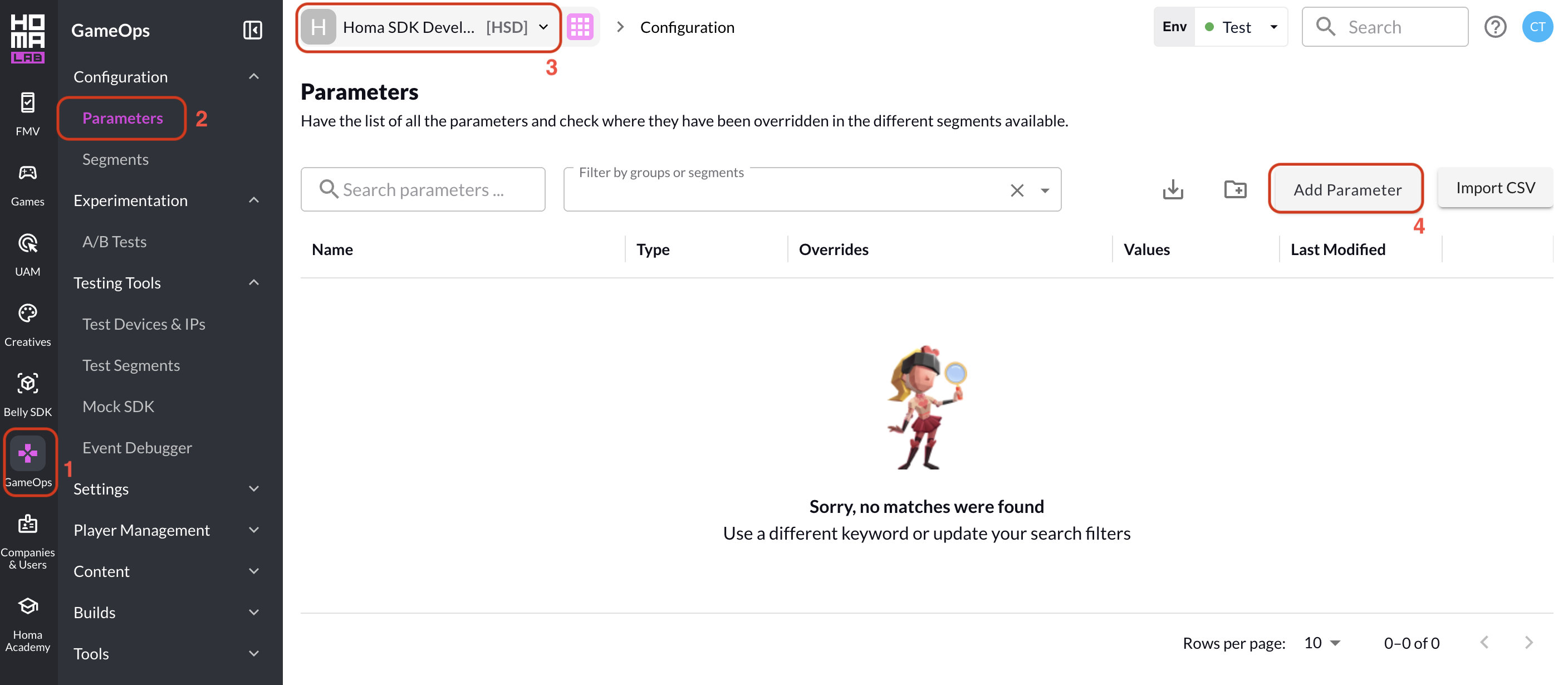
In the Homa Lab main page:
- Click the "GameOps" > "Configuration" from the left sidebar.
- Click the "Parameters" tab.
- Select the game you want to change the configuration for.
- Click the "Add Parameter" button.
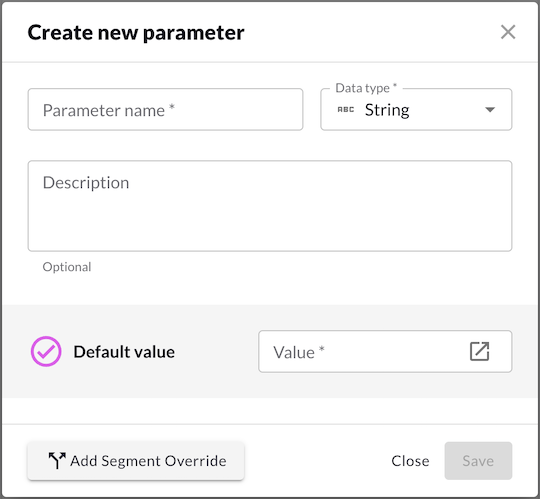
Create a new parameter with the following settings:
- Parameter name:
health_scaling(can be any name) - Data type:
Float - Default Value: The new value for the
HealthScalingFactorproperty.
Create LiveOps parameter binding
Note
LiveOpsValueAttribute was introduced in com.homagames.liveops 0.12.0, replacing LiveOpsConfigAttribute (available since 0.8.0). If you are on an earlier version, use [LiveOpsConfig] instead of [LiveOpsValue].
Add LiveOpsValueAttribute to your parameter with:
- Parameter:
health_scaling(Name of the parameter created in Homa Lab)
using Homa.Sdk.Configuration;
using UnityEngine;

[Config("enemy-balance")]
public partial class EnemyBalanceConfig
{
    [LiveOpsValue(Parameter = "health_scaling")]
    public float HealthScalingFactor;
}
Tip
You can also use LiveOpsValueAttribute directly on the Config class.
Update Config in runtime
With the LiveOps parameter and LiveOps Config set up, the HealthScalingFactor property of the EnemyBalanceConfig object can receive runtime updates.
You can use the UpdateAvailable event and UpdateConfig() method to update the config object when a new version is available.
configHandle.UpdateAvailable += () =>
{
    configHandle.UpdateConfig();
};
Tip
Pay attention to when you update your Configs. Updating the Config mid-level can lead to unwanted inconsistencies.
You can check if Config in the Config handle is outdated with IsUpToDate property. Note that config handles are always up to date immediately after calling GetHandle<T>().
var configHandle = Config.GetHandle<EnemyBalanceConfig>();

Debug.Log($"Config is up to date: {configHandle.IsUpToDate}");
Summary
In this tutorial, you learned how to set up your project with LiveOps parameters to modify the runtime data of a config object.