Remote Configuration - LiveOps (DVR)
Caution
This page describes the legacy DVR (Dynamic Variables) system, available in Homa Belly prior to SDK Core 5. For new projects, use the Configuration module instead, which supersedes DVR.
Introduction
LiveOps allows your game to run different configurations in runtime within a single build. LiveOps will automatically obtain the remote configuration and make it available through a class named DVR.
Getting Started
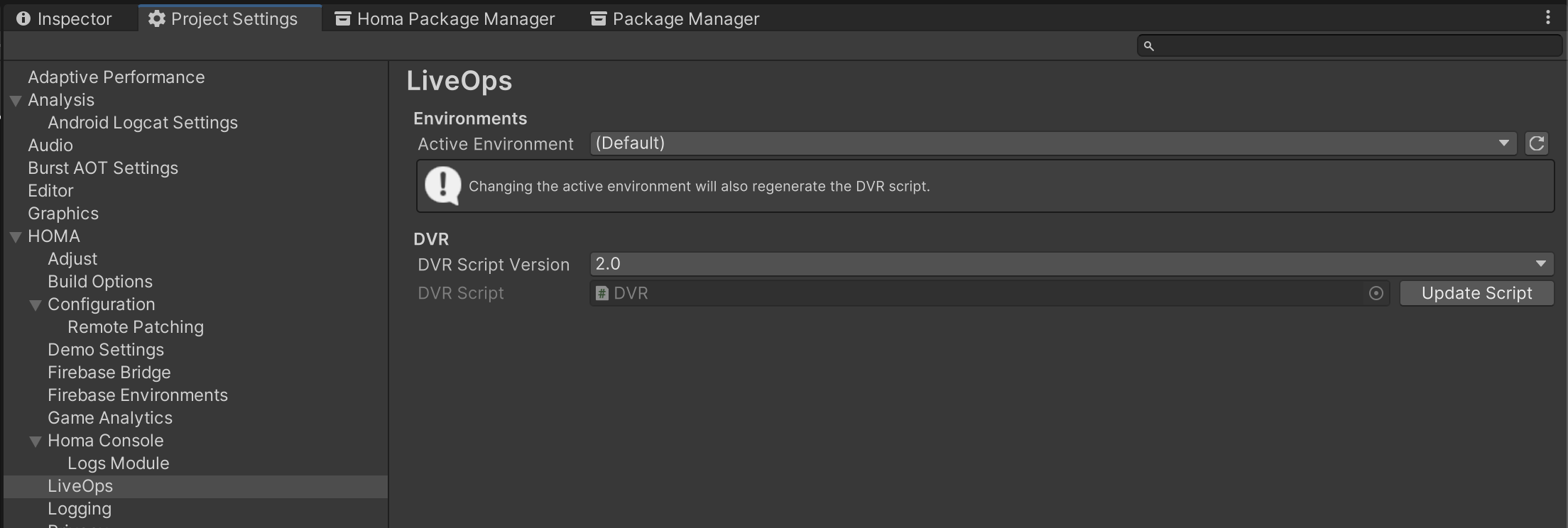
You can generate a C# script that grants you access to LiveOps parameters. To generate this script: Open project settings window Edit > Project Settings, go to HOMA > LiveOps section, click Update Script button
Initialisation
Dynamic Variables are fetched on game start, you can check if remote values are fetched using this callback:
HomaGames.Geryon.Config.OnInitialized += () =>
{
     // remote values are now fetched
};
if (HomaGames.Geryon.Config.Initialized)
{
     // another way to check if remote values are fetched
}
Using Dynamic Variables
Starting with Homa Belly version 1.10.+, you have access to a new Dynamic Variable version 2 interface (DVR v2).
New projects will start with DVR v2 by default, and we recommend switching to v2 when possible. You can manage which version of the DVR interface you use in the HOMA > LiveOps project settings.
Dynamic Variables will always contain the proper value once LiveOps is initialised. You should not persist dynamic variables. They may be updated either with configuration overrides, or using segmentation.
DVR v2
This version allows you to read the value directly, and/or be notified whenever the value changes in the future.
Here is an example with a "MAX_FPS" variable:
// Read the value once
Application.targetFrameRate = DVR.MaxFps;

// ==== AND/OR ====

// Subscribe a delegate that will be called every time the value is updated
DVR.MaxFps.Subscribe(newFpsValue =>
{
  Application.targetFrameRate = newFpsValue;
},
    // Setting this to true will cause the delegate to be called when Subscribe is invoked.
    // It is true by default
    notifyOnSubscribe: true);
DVR v1 (Legacy)
This version has fewer features. You can only read the configuration value.
For example, assuming you have a dynamic variable named VIDEO_ADS_ENABLED, you should use it like:
if(DVR.VIDEO_ADS_ENABLED)
{
    // Show rewarded video ad
}
else
{
    // Do nothing, as this test configuration
    // has VIDEO_ADS_ENABLED to false
}